quilt
Each Quilt stack includes an Elasticsearch cluster that indexes objects and packages as documents. The objects in Amazon S3 buckets connected to Quilt are synchronized to an Elasticsearch cluster, which provides Quilt’s search and package listing features.
NOTE: This page is about full-text searching using Elasticsearch. For precise querying of specific fields, see the Queries page.
Indexing
Quilt maintains a near-realtime index of the objects in your S3 bucket in Elasticsearch. Each bucket corresponds to one or more Elasticsearch indexes. As objects are mutated in S3, Quilt uses an event-driven system (via SNS and SQS) to update Elasticsearch.
There are two types of indexing in Quilt:
- shallow indexing includes object metadata (such as the file name and size)
- deep indexing includes object contents. Quilt supports deep
indexing for the following file extensions:
- .csv, .html, .json, .md, .rmd, .rst, .tab, .txt, .tsv (plain-text formats)
- .fcs (FlowJo)
- .ipynb (Jupyter notebooks)
- .parquet
- .pptx
- .xls, .xlsx
Search page
The search page in the catalog, accessible from the search bar or the “Search” entry in the left-hand navigation, provides a convenient way for searching objects and packages across the Amazon S3 buckets in your stack.
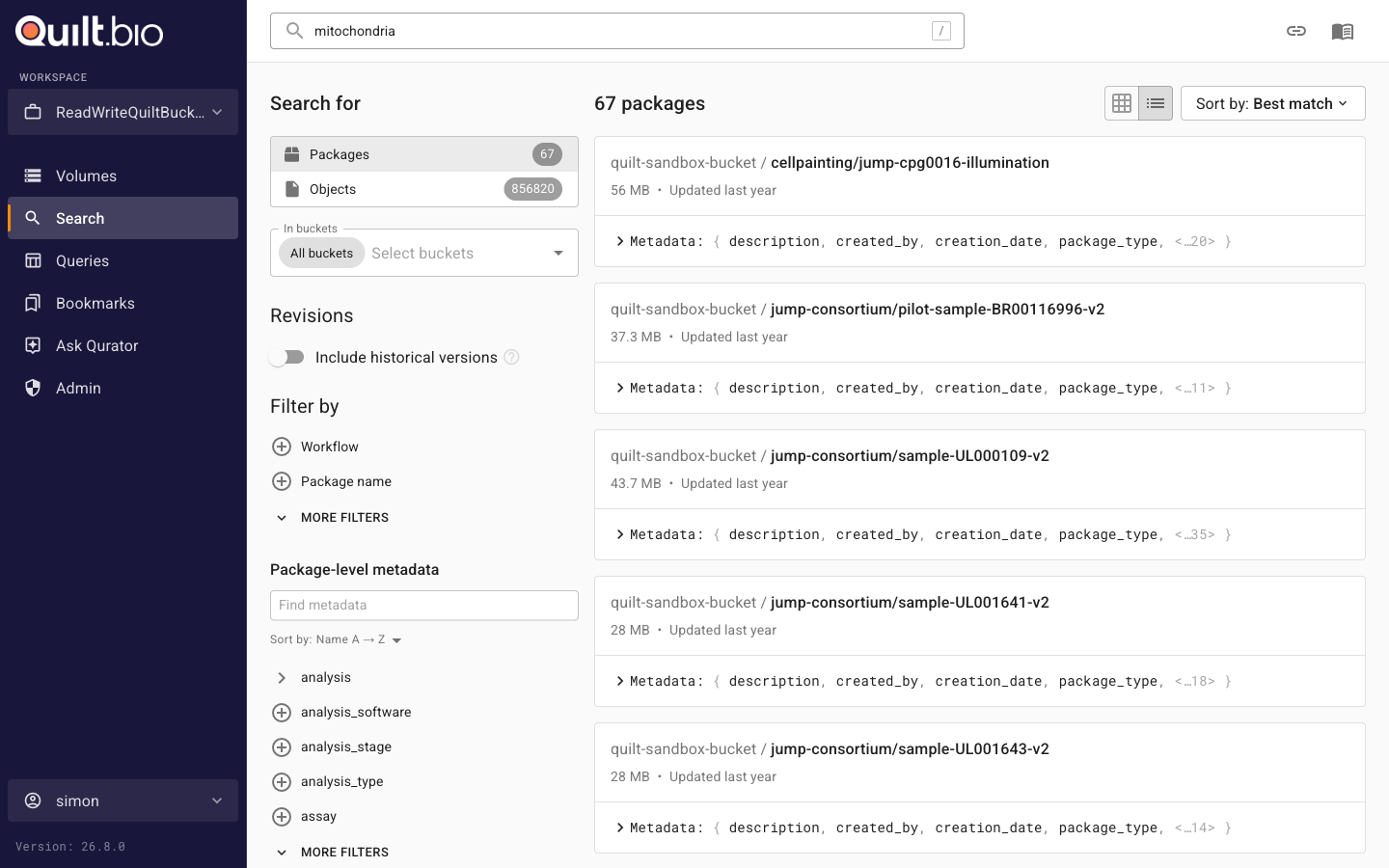
Result types and scope
Results are either packages (the default) or objects; switch between the two at the top of the filter panel. The bucket selector scopes the search to one or more buckets, or to all buckets you can access.
Filters
Each result type has its own set of system filters:
- Packages: last modified date, cumulative package size, package name, package hash, total number of files in the package, package revision comment, and workflow.
- Objects: last modified date, object size, extension, object key, contents, and delete marker.
Package searches can additionally be filtered by package-level metadata: the filter panel lists the metadata fields present in matching packages, typed (keyword, number, date, boolean), so you can add a facet for any metadata field your packages define.
Historical versions
By default, package searches match only the latest revision of each package. Turn on the Include historical versions toggle in the filter panel to also match prior revisions.
Views and sorting
Results display as a list or as a table with togglable columns and per-column sorting. The sort dropdown offers: Best match, Most recent first, Least recent first, A → Z, and Z → A.
Query syntax
NOTE: Quilt uses Elasticsearch 7.10 query string syntax.
If your query contains none of the Elasticsearch special syntax below (field
selectors, wildcards, quotes, logical operators, grouping, fuzzy or negation
operators), the catalog automatically appends a trailing * so that plain
terms match as substrings. Queries that use any special syntax are passed
through unchanged.
The following are all valid search parameters:
Object-specific Fields
| Name | Type | Description | Example |
|---|---|---|---|
content |
text |
Object content | content:Hello |
ext |
keyword |
Object extension | ext:*.fastq.gz |
key |
keyword |
Object key | key:phase* |
key_text |
text |
Analyzed object key | key:"phase" |
last_modified |
date |
Last modified date | last_modified:[2022-02-04 TO 2022-02-20] |
size |
long |
Object size in bytes | size:>=4096 |
version_id |
keyword |
Object version id | version_id:t.LVVCx* |
Package-specific Fields
All the package metadata is indexed in ES as three different types of documents:
- Manifests (
mnfst) contain package metadata, including the hash, comment, and workflow information. - Pointers (
ptr) represent named package revisions, and associate Manifests with names and tags. - Entries (
entry) represent individual objects in the package with their metadata.
Top-level hits displayed by the search page are always Pointers, merged with the corresponding Manifest and matching Entries. A Pointer is considered a hit if it matches the search query, or if any of its associated documents, i.e. Manifest or Entries (either metadata or contents), match the search query.
| Name | Type | Description | Example |
|---|---|---|---|
ptr_name |
keyword |
Package name | ptr_name:examples\/metadata |
ptr_name.text |
text |
Analyzed version of the above | ptr_name.text:examples |
ptr_tag |
keyword |
Package revision tag in S3; either “latest” or a timestamp (e.g. “1741661321”) | ptr_tag:latest |
ptr_last_modified |
date |
Package revision last modified date | ptr_last_modified:[2022-02-04 TO 2022-02-20] |
mnfst_hash |
keyword |
Package manifest hash | mnfst_hash:3192ac1* |
mnfst_stats.total_bytes |
long |
Package total bytes | mnfst_stats.total_bytes:>1000000 |
mnfst_stats.total_files |
long |
Package total files | mnfst_stats.total_files:<100 |
mnfst_metadata |
text |
Package metadata | mnfst_metadata:dapi |
mnfst_message |
text |
Commit message / comment | mnfst_message:TODO |
mnfst_workflow.id |
keyword |
Package workflow ID | mnfst_workflow.id:verify-metadata |
entry_lk |
keyword |
Entry logical key | entry_lk:examples\/metadata\/example.csv |
entry_lk.text |
text |
Analyzed version of the above | entry_lk.text:example |
entry_pk |
keyword |
Entry physical key | entry_pk:*example.csv |
entry_pk.text |
text |
Analyzed version of the above | entry_pk.text:example |
entry_pk_parsed.s3.bucket |
keyword |
S3 bucket of the entry | entry_pk_parsed.s3.bucket:my-bucket |
entry_pk_parsed.s3.key |
keyword |
S3 key of the entry | entry_pk_parsed.s3.key:example.csv |
entry_pk_parsed.s3.key.text |
text |
Analyzed version of the above | entry_pk_parsed.s3.key.text:example |
entry_pk_parsed.s3.version_id |
keyword |
S3 version ID of the entry | entry_pk_parsed.s3.version_id:abc123* |
entry_size |
long |
Entry size in bytes | entry_size:>1000000 |
entry_hash.type |
keyword |
Entry hash type | entry_hash.type:sha2-256-chunked |
entry_hash.value |
keyword |
Entry hash value | entry_hash.value:T12mNNNsyfzayKFQQEXI6Ichf8AtuMbhw5c0oPg7fTo= |
entry_metadata |
text |
Entry metadata | entry_metadata:example |
Logical operators and grouping
| Syntax | Description | Example |
|---|---|---|
AND |
Conjunction | a AND b |
OR |
Disjunction | a OR b |
NOT |
Negation | NOT a |
_exists_ |
Matches any non-null value for the given field | _exists_: content |
() |
Group terms | (a AND b) NOT c |
Wildcard and regular expressions
| Syntax | Description | Example |
|---|---|---|
* |
Zero or more characters, avoid leading * (slows performance) |
ext:config.y*ml |
? |
Exactly one character | ext:React.?sx |
// |
Regular expression (slows performance) | content:/lmnb[12]/ |
ELASTICSEARCH tab
When you click into a specific bucket, you can access the Elasticsearch tab to run more complex queries. The Elasticsearch tab provides a more powerful search interface than the search bar, allowing you to specify the Elasticsearch index and query parameters.
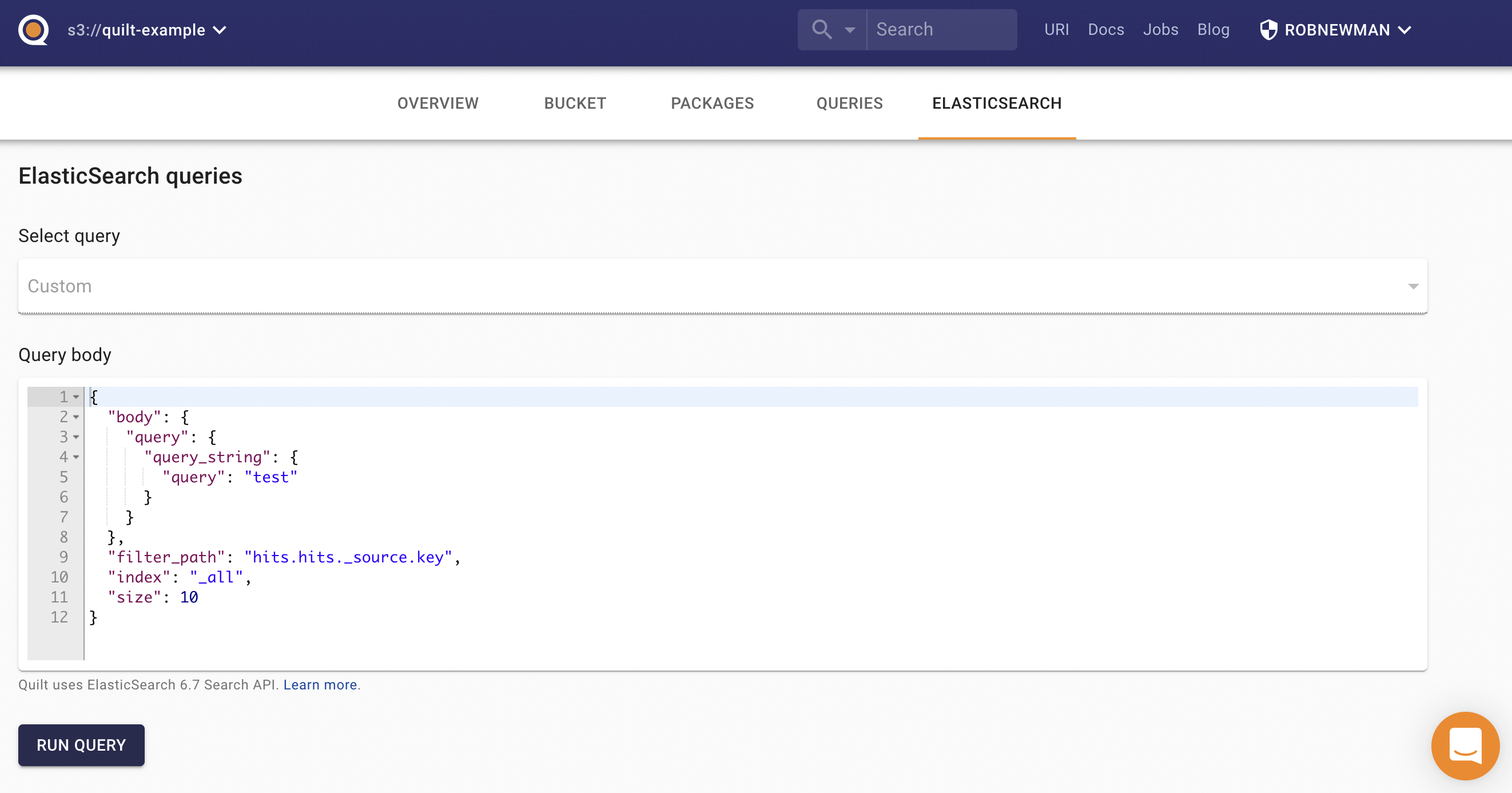
Quilt Elasticsearch queries support the following keys:
index— comma-separated list of indexes to search (learn more)filter_path— to reducing response nesting, (learn more)_source— boolean that adds or removes the_sourcefield, or a list of fields to return (learn more)size— limits the number of hits (learn more)from— starting offset for pagination (learn more)body— the search query body as a JSON dictionary (learn more)
Secure Search
Secure Search adds object-level permission enforcement to search results. When enabled, it filters Elasticsearch hits by verifying the user’s actual S3 permissions using HEAD requests. This ensures that users only see results they are authorized to access, providing stronger restrictions beyond just bucket-level indices.