quilt
Catalog Troubleshooting
Overview stats (objects, packages) seem incorrect or aren’t updating
Packages tab doesn’t work
Packages or stats are missing or are not updating
These are all symptoms of the same underlying issue: the Elasticsearch index is out of sync. If any of the following are true, please wait a few minutes and try again:
- you recently added the bucket or upgraded the stack
- search volume is high, or
- read/write volume is high
If that doesn’t work, try the following steps:
Re-index the bucket
If you have less than 1 million objects in the bucket, you should re-index the bucket:
-
Open the bucket overview in the Quilt catalog and click the gear icon (upper right), or navigate to Admin settings > Buckets and inspect the settings of the bucket in question.
-
Under “Indexing and notifications”, click “Re-index and Repair”.
Optionally: if and only if bucket notifications are not working and you are certain that there are no other subscribers to the S3 Events of the bucket in question, check “Repair S3 notifications”.
Bucket packages, stats, and the search index will repopulate in the next few minutes.
However, if you have more than 1 million objects in the bucket, re-indexing will take much longer and potentially become expensive. In that case, please try the below steps. If those do not work, please contact Quilt support.
Inspect the Elasticsearch domain
-
Determine your Quilt instance’s Elasticsearch domain from Amazon Console > OpenSearch or
aws opensearch list-domain-names. Note the domain name (hereafterQUILT_DOMAIN). - Run the following command and save the output file:
aws es describe-elasticsearch-domain --domain-name "$QUILT_DOMAIN"\ > quilt-es-domain.json -
Visit Amazon Console > OpenSearch >
QUILT_DOMAIN> Cluster health. -
Set the time range as long as possible to fully overlap with your observed issues.
-
Screenshot the Summary, Overall Health, and Key Performance Indicator sections
- Send the JSON output file and screenshots to Quilt support.
As a rule you should not reconfigure your Elasticsearch domain directly as this will result in stack drift that will be lost the next time you update your Quilt instance.
“Session expired” notice
There are two reasons for encountering the “Session expired” notice
after clicking the RELOAD button in the Quilt Catalog.
- Your browser cache is out of date, in which case you need to:
- Delete session storage
- Delete local storage
- Delete cookies
- Your Quilt user Role has been corrupted. You will need a Quilt Admin user to reset your Quilt user Role to a default (and valid) Role.
Browser Network and Console Logs
To help diagnose Catalog issues:
- Go to the affected page in your Quilt Catalog.
- Open the browser Developer tools:
- Google Chrome: Press F12, Ctrl+Shift+I or from the Chrome menu select More tools > Developer tools.
- Select the Network tab.
- Ensure the session is recorded:
- Google Chrome: Check the red button in the upper left corner is set to Record.
- Ensure Preserve Log is enabled.
- Perform the action that triggers the error (e.g. clicking the
Download
package
button). - Export the logs as HAR format.
- Google Chrome: Ctrl + Click anywhere on the grid of network requests and select Save all as HAR with content.
-
Save the HAR-formatted file to your localhost.
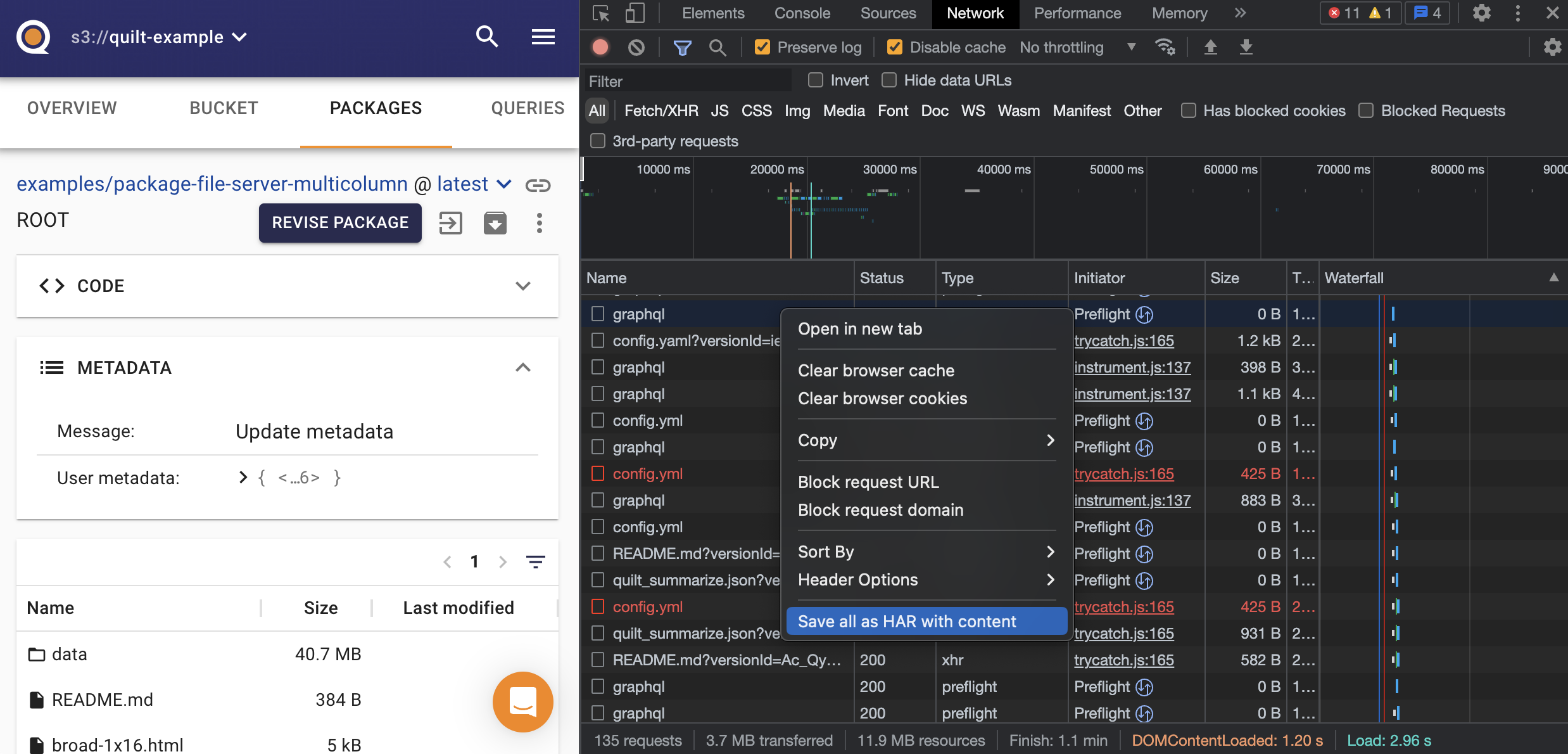
- Ensure the session is recorded:
- Select the Console tab.
- Perform the action that triggers the error (e.g. clicking the
Download
package
button). - Export the logs.
- Google Chrome: Ctrl + Click anywhere on the grid of network requests and select Save as….
- Save the log file to your localhost.
- Perform the action that triggers the error (e.g. clicking the