quilt
Good-practice (GxP) and Quilt
Overview
GxP environments for labs, manufacturing, documentation, and clinical practice require what we call a “data chain of custody” that enables Quilt users to understand where data came from, who produced it, when it was produced, and why it should be trusted.
The GxP module for Quilt includes the following key features:
- Strong cryptographic checksums for data at the object level and at the collection (or package) level
- Integrated IQ (installation qualification) and OQ (operational qualification) testing to help you automate tedious manual qualification cycles into tests run by machines and reported to you.
Status monitoring
Architectural overview
The Quilt status monitoring system consists of four parts:
- Canaries: A collection of end-to-end quality tests for key operational functionality provided by Quilt. They are run on a schedule in your AWS infrastructure.
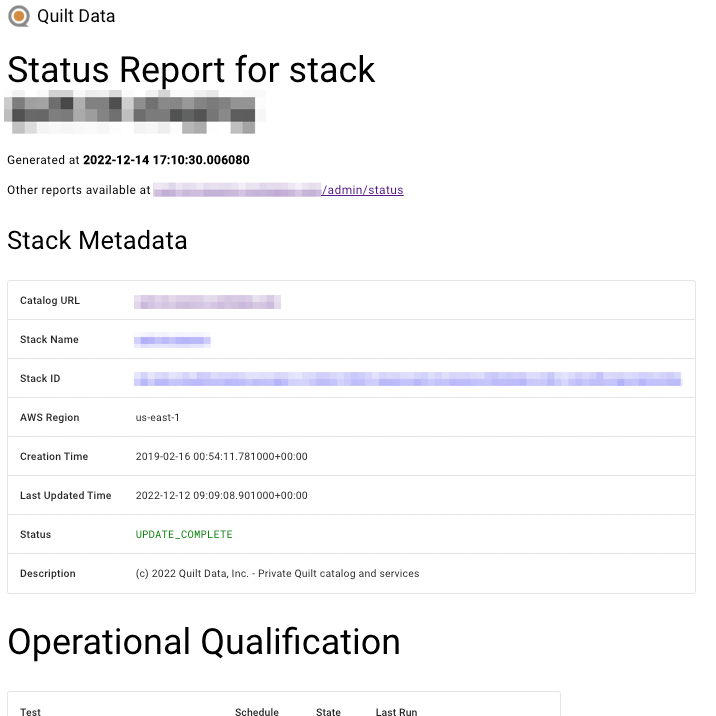
- Status reports: Simple HTML files generated on a daily schedule
by an AWS Lambda function (
status_reports) and stored in a dedicated Amazon S3 bucket. The HTML files contain the most recent canary run results (Operational Qualification) and Quilt instance Cloud Formation parameters and outputs (Infrastructure Qualification).- Operational Qualification report: all canary test results and status (historical and current)
- Infrastructure Qualification report: all CloudFormation parameters and status
- Administrative User Interface: An HTML page in the Quilt catalog that displays the current operational status of a Quilt instance and provides access to current and historical status reports.
- Amazon SNS topic: Users can subscribe to the topic and receive
canary error notifications (available as
CanaryNotificationsTopicstack output).
Setting up status monitoring for a Quilt instance
In order to enable status monitoring for a Quilt instance, the following conditions must be met:
- The Quilt instance CloudFormation template must have canaries enabled
- The correct template parameters must be provided during the Quilt instance CloudFormation deployment
The required Quilt and AWS resources are provisioned automatically by the Quilt deployment.
List of canaries
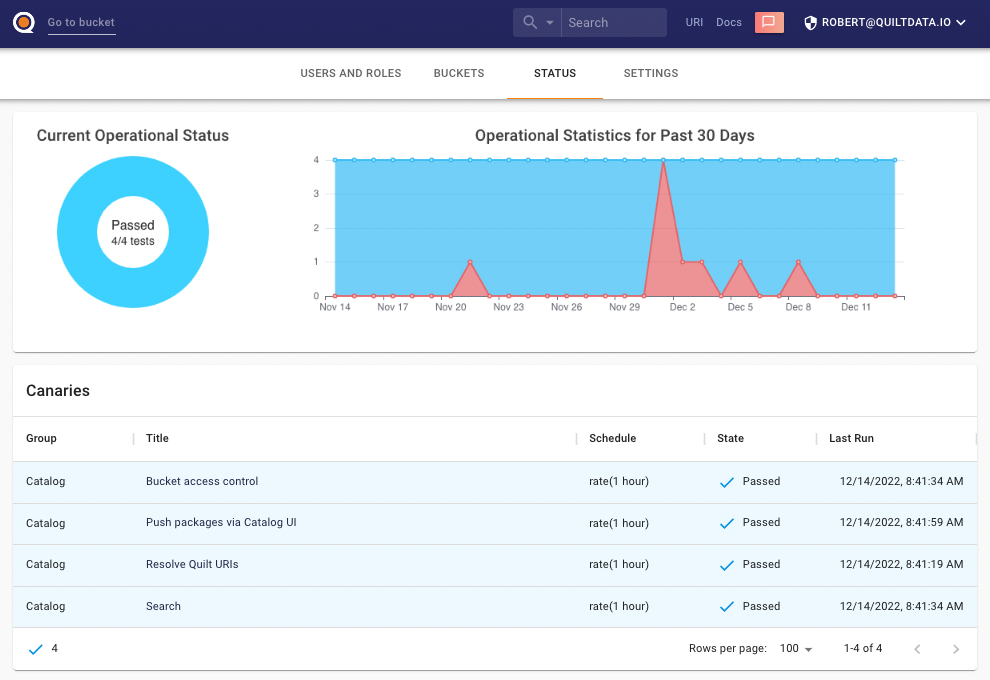
There are currently four end-to-end quality tests:
BucketAccessControl: Test that Users can only access specifically allowed Amazon S3 bucketsImmutable URIs: Test to resolve immutable Quilt URIsPackagePushUi: Test packagepushfunctionality via Quilt catalog package creation dialogSearch: Search S3 objects and Quilt packages in the Quilt catalog
Quilt instance CloudFormation deployment parameters
When deploying a Quilt instance using a CloudFormation template with canaries enabled, you will have to provide the following parameters:
CanaryNotificationsEmail(if enabled): A valid email address to send canary failure and error notifications
Accessing current operational status and reports archive
Go to your Quilt web-based catalog administration panel, “Status” tab (under the /admin/status URL). There you can see the stack’s current operational status (as well as the chart with historic data for the last month) and the reports table (which can be sorted / filtered) where you can preview or download stored reports (HTML files).
Getting notifications about canary failures
For convenience, the following canary-related events are forwarded
to an SNS topic (available as CanaryNotificationsTopic in the
Quilt instance CloudFormation deployment Outputs tab):
- A canary entering error state
- A canary run failure
Quilt administrators can subscribe to this SNS topic to receive these event notifications and process them appropriately (e.g. notifying first responders or sending to incident management systems).
If enabled (see set-up instructions above), these events will be
also sent as emails to the configured address (CanaryNotificationsEmail
CloudFormation template parameter).
Audit Trail
Audit trails enable you to track which users had which permissions at which time. While data access to S3 is logged via CloudTrail, certain “admin plane” events such as the following are logged to a managed S3 bucket and exposed via an Athena table:
- A user logs into the Catalog
- A user role is changed
- A user is added, deleted, or inactivated in the Catalog
Audit events
Audit events are stored as JSON records in JSONL files in a managed audit trail S3 bucket.
Event structure
-
eventVersion: str, (required, since 1.0)Version of the event record.
-
eventTime: datetime(required, since 1.0)When the action was completed (in UTC).
-
eventID: str(required, since 1.0)A unique ID (UUID) of the event.
-
eventSource: "QuiltServer" | "QuiltScript"(required, since 1.0)The service or part of the system that this event originates from.
-
eventType: "QuiltApiCall" | "QuiltScriptInvocation"(required, since 1.0)The type of event that generated the event record.
-
eventName: str(required, since 1.0)The name of action performed in the form
${namespace}.${operationName}, e.g.Users.Create. See Event Taxonomy for details. -
userAgent: str(optional, since 1.0)The agent through which the request was made, such as a web browser, a Quilt Stack or Quilt Python Client.
-
sourceIPAddress: str(optional, since 1.0)The IP address that the request was made from.
-
userIdentity: UserIdentity(required, since 1.0)Information about the identity that performed the action. Refer to UserIdentity section below for details.
-
requestID: str(optional, since 1.0)Request ID based on AWS ALB request tracing capabilities.
-
requestParameters: object(required, since 1.0)The parameters, if any, that were sent with the request. These parameters are documented under Event Taxonomy section.
-
responseElements: any(optional, since 1.0)The response data, if any.
-
errorCode: str(optional, since 1.0)Only present if an error occurred while trying to perform an action,
nullwhen the action succeeds. -
errorMessage: str(optional, since 1.0)Description of the error.
-
additionalEventData: object(optional, since 1.0)Additional data about the event that was not part of the request or response.
Event source and type
When a Quilt Server API is called (GraphQL query or HTTP endpoint),
eventSource is set to QuiltServer and eventType – to QuiltApiCall.
When an admin script is invoked (this usually happens on stack bring-up / upgrade),
eventSource is set to QuiltScript and eventType – to QuiltScriptInvocation.
Event schema versioning
Event records are versioned using SemVer-like versioning scheme (MAJOR.MINOR).
MAJOR version is incremented on backwards-incompatible changes to the schema,
e.g. removing a JSON field that already exists, or changing how the contents of
a field are represented (for example, a date format).
MINOR version is incremented on backwards-compatible changes, such as adding
new fields to the event structure.
GraphQL requests
For GraphQL requests,
query (mutation) parameters are recorded as requestParameters,
and response data (respecting the selection set) are recorded as responseElements.
Errors are inferred and recorded to errorCode / errorMessage.
User Identity
All UserIdentity variants are stored as JSON objects with a required type field.
Other fields vary based on the type of the recorded user identity.
QuiltUser
Represents an authenticated Quilt User.
Attributes:
type: "QuiltUser"id: struserName: stremail: strisAdmin: boolisActive: boolisSsoOnly: boolisService: boollastLogin: datetimedateJoined: datetimeroleId: str(optional) - An ID of the associated Quilt Role.sessionContext: SessionContext(optional, since Platform version 1.67) - Authentication context for the session.
SessionContext
Contains information about how the user authenticated.
Attributes:
auth: AuthContext- Authentication method details.
AuthContext
Discriminated union with type field:
InteractiveAuth: User authenticated via SSO/OAuth.type: "interactive"
APIKeyAuth: User authenticated via API key.type: "api_key"keyId: str- The API key ID.keyName: str- User-provided name of the key.keyFingerprint: str- Display fingerprint (e.g.,qk_abc...xyz).
Unidentified
Represents a user we were unable to identify.
In QuiltApiCall actions, this means an anonymous (unauthenticated) user,
e.g. we can’t identify a user trying to sign-in with a non-registered username.
In QuiltScript actions, this means the execution environment doesn’t have
AWS credentials available – this shouldn’t happen in our production installations.
Attributes:
type: "Unidentified"
IAMUser
Represents an AWS/IAM user (e.g. when ECS invokes an admin script).
Records the data returned by sts:GetCallerIdentity.
Attributes:
type: "IAMUser"account: str- The AWS account ID number of the account that owns or contains the calling entity.id: str- The unique identifier of the calling entity.arn: str- The AWS ARN associated with the calling entity.
Event Taxonomy
See the GraphQL schema for GraphQL type reference.
Auth namespace
All the authentication-related operations.
Auth.RefreshToken
Authentication token refreshed.
request_parametersrefresh_token: "***"
responseElementsaccess_token: "***"refresh_token: "***"expires_at: datetime
additionalEventDatamethod: "code" | "refresh"
Auth.Login
User logged in.
requestParametersprovider: str(whenmethodisoauth)code: "***"(whenmethodisoauth)username: str(whenmethodispassword)password: "***"(whenmethodispassword)
additionalEventDatamethod: "oauth" | "password"account_id: str(whenmethodisoauth)email: str(whenmethodisoauth)user_created: true(whenmethodisoauthand new user was created)account_linked: true(whenmethodisoauthand existing user was linked with a new OAuth identity)
responseElementsaccess_token: "***"refresh_token: "***"exp: datetime
Auth.ServiceLogin
A service user (Canary) logged in.
requestParametersprovider: strtoken: "***"
additionalEventDataaccount_id: str
responseElementsaccess_token: "***"refresh_token: "***"exp: datetime
Auth.Activate
A user was activated.
Auth.PasswordResetRequest
Password reset requested.
requestParametersemail: str
Auth.PasswordChange
User password changed.
requestParameterspassword: "***"link: "***"
Auth.Register
User signed up.
requestParametersusername: stremail: strpassword: "***"
additionalEventDatadefault_role_id: str
Auth.Logout
User signed out.
Auth.IssueCode
OAuth code issued.
responseElementscodeuser_id: strcode: strexpires: datetimesso_provider: strsso_access_token: "***"sso_refresh_token: "***"sso_expires: datetime
Auth.GetAWSCredentials
AWS credentials issued for a Quilt user.
responseElementsAccessKeyId: strSecretKey: "***"SessionToken: "***"
Auth.APIKey
API key authentication attempt (logged on failure only).
requestParametersfingerprint: str- Truncated key fingerprint (e.g.,qk_abc...xyz), never the full secret
errorCodeINVALID- Key not found or invalid formatEXPIRED- Key has expiredUSER_INACTIVE- Key owner is inactive
APIKeys namespace
API key management operations. Available to all authenticated users for their own keys.
APIKeys.Create (GraphQL: Mutation.apiKeyCreate)
API key created.
requestParametersinputname: strexpiresInDays: int
responseElementsapiKeyid: strname: strfingerprint: strstatus: strcreatedAt: datetimeexpiresAt: datetime
secret: "***"- Always redacted in audit logs
APIKeys.Revoke (GraphQL: Mutation.apiKeyRevoke)
API key revoked (deleted).
requestParametersid: str(when revoking by ID)secret: "***"(when revoking by secret, always redacted)
APIKeys.Admin.Revoke (GraphQL: Mutation.admin.apiKeys.revoke)
Admin revoked another user’s API key.
requestParametersid: str
Users namespace
User management operations. Only accessible by the admin users.
Users.List
List users. Response data is not logged.
Users.Create
User created.
requestParametersusername: stremail: str
Users.Disable
User disabled.
requestParametersusername: str
Users.Enable
User enabled.
requestParametersusername: str
Users.EditEmail
User’s email changed.
requestParametersusername: stremail: str
Users.GrantAdmin
User is granted with admin rights.
requestParametersusername: str
Users.RevokeAdmin
User is revoked admin rights.
requestParametersusername: str
Users.Delete
User deleted.
requestParametersusername: str
Users.ResetPassword
User’s password reset.
requestParametersusername: str
Users.SetRole
User’s role updated.
requestParametersusername: strrole: str- Role name
Buckets namespace
Bucket management operations. Only accessible by the admin users.
Buckets.Add (GraphQL: Mutation.bucketAdd)
Bucket added to the stack.
Buckets.Update (GraphQL: Mutation.bucketUpdate)
Bucket settings updated.
Buckets.Remove (GraphQL: Mutation.bucketRemove)
Bucket removed from the stack.
Policies namespace
Quilt Policy management operations. Only accessible by the admin users.
Policies.Create (GraphQL: Mutation.policyCreateManaged / Mutation.policyCreateUnmanaged)
Quilt Policy created.
requestParameters.managed is set accordingly.
Policies.Update (GraphQL: Mutation.policyUpdateManaged / Mutation.policyUpdateUnmanaged)
Quilt Policy updated.
requestParameters.managed is set accordingly.
Policies.Delete (GraphQL: Mutation.policyDelete)
Quilt Policy deleted.
Roles namespace
Quilt Role management operations. Only accessible by the admin users.
Roles.Create (GraphQL: Mutation.roleCreateManaged / Mutation.roleCreateUnmanaged)
Quilt Role created.
requestParameters.managed is set accordingly.
Roles.Update (GraphQL: Mutation.roleUpdateManaged / Mutation.roleUpdateUnmanaged)
Quilt Role updated.
requestParameters.managed is set accordingly.
Roles.Delete (GraphQL: Mutation.roleDelete)
Quilt Role deleted.
Roles.SetDefault (GraphQL: Mutation.roleSetDefault)
Quilt Role set as default.
Scripts namespace
Admin scripts. Usually invoked by CloudFormation on stack bring-up / upgrade.
All Scripts.* events contain the following data:
additionalRequestDatascript_name: str- Script filenamescript_args: str[]- List of argumentsscript_command: str- The whole unparsed command string
-
userIdentity: IAMUser- AWS identity of the user executing the script requestParameters: object- Parsed named script arguments
Scripts.CreateAdmin
Create an admin user account. Succeeds once on stack bring-up, fails on subsequent stack upgrades.
requestParametersenv: bool- Pass account info in environment variablesrole_name: str(optional) - Name for the Quilt roleemail: strpassword: "***"(optional)
additionalEventDatarole_id: str(optional) - ID of the Quilt Role, if found by the namerole_name(when provided).
Scripts.CreateRole
Add a named role to the stack, or set the ARN of a role if a role with the specified name already exists.
requestParametersname: strarn: str(optional) - ARN for AWS Role that is associated with this Quilt Roledefault: bool- Set this role as default if default role is not already set
Scripts.UpdateBucketResources
Update all bucket-related resources: policies, indexes, SNS, cloudtrail, …
additionalEventDatasubscriptions_created: list- A mapping (list of tuples) of bucket names to ARNs of associated subscriptions created by the scriptsubscription_errors: list- A mapping (list of tuples) of bucket names to error messages received while trying to create associated subscriptions
Scripts.SetupCanaries
Create a canary user (_canary <canary@quiltdata.io>) and set up resources
required for running continuous integration testing (OQ monitoring).
requestParametersbucket_allowed: strbucket_restricted: str
Example event records
Admin user creation (failed because the user was created earlier):
{
  "eventVersion": "1.0",
  "eventTime": "2023-06-08T13:55:27Z",
  "eventID": "3d59b43a-3c31-48b1-bd5c-a039af87fdc5",
  "eventSource": "QuiltScript",
  "type": "QuiltScriptInvocation",
  "eventName": "Scripts.CreateAdmin",
  "userAgent": "quilt-stack quilt-registry (Linux 5.10.179-166.674.amzn2.x86_64) CPython/3.8.16",
  "sourceIPAddress": null,
  "userIdentity": {
    "type": "IAMUser",
    "id": "*REDACTED*",
    "account": "*REDACTED*",
    "arn": "arn:aws:sts::*REDACTED*:assumed-role/*REDACTED*"
  },
  "requestParameters": {
    "env": true,
    "role_name": "ReadWriteQuiltBucket",
    "email": "example@quiltdata.io",
    "password": null
  },
  "responseElements": null,
  "errorCode": "Conflict",
  "errorMessage": "Email already taken.",
  "additionalEventData": {
    "script_name": "./scripts/create_admin.py",
    "script_args": ["-e", "-r", "ReadWriteQuiltBucket"],
    "script_command": "./scripts/create_admin.py -e -r ReadWriteQuiltBucket",
    "role_id": "*REDACTED*"
  }
}
A user with admin rights authenticated using password:
{
  "eventVersion": "1.0",
  "eventTime": "2023-06-08T13:59:36Z",
  "eventID": "92e66ee3-42fd-4142-990d-9d54059c583b",
  "eventSource": "QuiltServer",
  "type": "QuiltApiCall",
  "eventName": "Auth.Login",
  "userAgent": "Mozilla/5.0 (X11; Linux x86_64; rv:109.0) Gecko/20100101 Firefox/113.0",
  "sourceIPAddress": "*REDACTED*",
  "userIdentity": {
    "type": "QuiltUser",
    "id": "*REDACTED*",
    "userName": "example_user",
    "email": "example_user@quiltdata.io",
    "isAdmin": true,
    "lastLogin": "2023-03-23T12:37:53Z",
    "isActive": true,
    "isSsoOnly": false,
    "isService": false,
    "dateJoined": "2020-11-16T03:32:01Z",
    "roleId": "*REDACTED*"
  },
  "requestParameters": { "username": "example_user", "password": "***" },
  "responseElements": {
    "access_token": "***",
    "refresh_token": "***",
    "exp": "2023-09-06T13:59:36Z"
  },
  "errorCode": null,
  "errorMessage": null,
  "additionalEventData": { "method": "password" }
}
A service user (Canary) authenticated:
{
  "eventVersion": "1.0",
  "eventTime": "2023-06-12T00:37:21Z",
  "eventID": "10b0901a-74cd-4e62-8954-33f4fba6e8ad",
  "eventSource": "QuiltServer",
  "type": "QuiltApiCall",
  "eventName": "Auth.ServiceLogin",
  "userAgent": "",
  "sourceIPAddress": "*REDACTED*",
  "userIdentity": {
    "type": "QuiltUser",
    "id": "*REDACTED*",
    "userName": "_canary",
    "email": "canary@quiltdata.io",
    "isAdmin": false,
    "lastLogin": "2022-11-24T13:55:31Z",
    "isActive": true,
    "isSsoOnly": false,
    "isService": true,
    "dateJoined": "2022-11-24T13:55:31Z",
    "roleId": "*REDACTED*"
  },
  "requestParameters": { "provider": "quilt-service-auth", "token": "***" },
  "responseElements": {
    "access_token": "***",
    "refresh_token": "***",
    "exp": "2023-09-10T00:37:21Z"
  },
  "errorCode": null,
  "errorMessage": null,
  "additionalEventData": { "account_id": "_canary" }
}
Querying With Athena
Audit events can be queried with AWS Athena. Quilt Stack provisions the following resources:
-
Audit Trail Database: a Glue database named
audittraildatabase-${random_string}, exposed asAuditTrailDatabasestack resource. -
Audit Trail Table: a Glue table named
audit_trailin Audit Trail Database. -
Audit Workgroup: an Athena workgroup named
${AWS::StackName}-audit, exposed asAuditTrailWorkgroupstack resource. -
Audit Trail Bucket: an S3 bucket storing all the audit trail data and Athena query results for Audit Workgroup.
-
Audit Trail Query Policy: a managed IAM policy allowing to query audit trail data via Athena, exposed as
AuditTrailAthenaQueryPolicystack resource.
In order to query audit trail data via AWS Athena Console, you should:
-
Ensure you have adequate permissions to query the data (e.g. use the Quilt-managed Audit Trail Query Policy).
-
Select
AwsDataCatalogfrom the “Data source” dropdown. -
Select Audit Trail Database from the “Database” dropdown.
-
Select Audit Workgroup from the “Workgroup” dropdown.
All the events are available in the audit_trail table,
which has the following fields (schema version 1.0):
eventversion: stringeventtime: timestampeventid: stringeventsource: stringeventtype: stringeventname: stringuseragent: stringsourceipaddress: stringuseridentity: stringrequestparameters: stringresponseelements: stringerrorcode: stringerrormessage: stringadditionaleventdata: stringrequestid: stringdate: string(partition)
The data is partitioned by date, which has YYYY/mm/dd format.
Partitioning
helps to make the queries faster and cheaper by reducing the amount of data scanned,
so it’s advised to always filter by the partition key when possible.
All the JSON objects from an event record are exposed to Athena as strings, so you can leverage athena JSON querying capabilities.
Example queries
When did a user with the specified email last log in?
SELECT
eventtime,
useragent,
sourceipaddress,
useridentity,
requestparameters,
responseelements,
additionaleventdata
FROM audit_trail
WHERE eventname = 'Auth.Login'
AND errorcode IS NULL
AND json_extract_scalar(useridentity, '$.type') = 'QuiltUser'
AND json_extract_scalar(useridentity, '$.email') = 'example@quiltdata.io'
ORDER BY eventtime DESC
LIMIT 1;
Example query result:
eventtime |
useragent |
sourceipaddress |
useridentity |
requestparameters |
responseelements |
additionaleventdata |
|---|---|---|---|---|---|---|
2023-06-08 13:59:36.000 |
Mozilla/5.0 (X11; Linux x86_64; rv:109.0) Gecko/20100101 Firefox/113.0 |
REDACTED | {"isssoonly":false,"isadmin":true,"lastlogin":"2023-03-23T12:37:53Z","roleid":"*REDACTED*","isactive":true,"isservice":false,"id":"*REDACTED*","type":"QuiltUser","datejoined":"2020-11-16T03:32:01Z","email":"example@quiltdata.io","username":"example"} |
{"password":"***","username":"example"} |
{"access_token":"***","refresh_token":"***","exp":"2023-09-06T13:59:36Z"} |
{"method":"password"} |
What are all the actions performed by a user with the given email today and which IP did they come from?
SELECT
eventtime,
eventname,
useragent,
sourceipaddress,
requestparameters,
responseelements,
additionaleventdata,
errorcode
FROM audit_trail
WHERE date = date_format(current_date, '%Y/%m/%d')
AND json_extract_scalar(useridentity, '$.type') = 'QuiltUser'
AND json_extract_scalar(useridentity, '$.email') = 'example@quiltdata.io'
ORDER BY eventtime
Example query result:
eventtime |
eventname |
useragent |
sourceipaddress |
requestparameters |
responseelements |
additionaleventdata |
errorcode |
|---|---|---|---|---|---|---|---|
2023-06-14 11:33:00.000 |
Auth.Login |
Mozilla/5.0 (Macintosh; Intel Mac OS X 10.15; rv:109.0) Gecko/20100101 Firefox/114.0 |
REDACTED | {"password":"***","username":"nl0"} |
{"access_token":"***","refresh_token":"***","exp":"2023-09-12T11:33:00Z"} |
{"method":"password"} |
|
2023-06-14 11:33:02.000 |
Auth.GetAWSCredentials |
Mozilla/5.0 (Macintosh; Intel Mac OS X 10.15; rv:109.0) Gecko/20100101 Firefox/114.0 |
REDACTED | {} |
{"secretkey":"***","sessiontoken":"***","accesskeyid":"ASIA2LR7MUT63B7CE5WE"} |
{} |
|
2023-06-14 11:33:07.000 |
Users.List |
Mozilla/5.0 (Macintosh; Intel Mac OS X 10.15; rv:109.0) Gecko/20100101 Firefox/114.0 |
REDACTED | {} |
{"results":[*REDACTED*]} |
{} |
|
2023-06-14 11:33:16.000 |
Users.Disable |
Mozilla/5.0 (Macintosh; Intel Mac OS X 10.15; rv:109.0) Gecko/20100101 Firefox/114.0 |
REDACTED | {"username":"*REDACTED*"} |
{} |
||
2023-06-14 11:33:42.000 |
Users.GrantAdmin |
Mozilla/5.0 (Macintosh; Intel Mac OS X 10.15; rv:109.0) Gecko/20100101 Firefox/114.0 |
REDACTED | {"username":"*REDACTED*"} |
{} |
||
2023-06-14 11:34:16.000 |
Roles.Update |
Mozilla/5.0 (Macintosh; Intel Mac OS X 10.15; rv:109.0) Gecko/20100101 Firefox/114.0 |
REDACTED | {"input":{"name":"*REDACTED*","policies":[*REDACTED*]},"managed":true,"id":"*REDACTED"} |
{"role":{*REDACTED*},"__typename":"RoleUpdateSuccess"} |
{"graphql_path":"roleUpdate"} |
|
2023-06-14 11:34:26.000 |
Auth.Logout |
Mozilla/5.0 (Macintosh; Intel Mac OS X 10.15; rv:109.0) Gecko/20100101 Firefox/114.0 |
REDACTED | {} |
{} |
Which users were active this month and what actions they performed?
SELECT
json_extract_scalar(useridentity, '$.id') as userid,
array_agg(DISTINCT json_extract_scalar(useridentity, '$.username')) as usernames,
array_agg(DISTINCT json_extract_scalar(useridentity, '$.email')) as emails,
array_agg(DISTINCT json_extract_scalar(useridentity, '$.isadmin')) as isadmin_values,
array_agg(DISTINCT json_extract_scalar(useridentity, '$.roleid')) as roles,
array_agg(DISTINCT sourceipaddress) as ips,
min(eventtime) as time_first,
max(eventtime) as time_last,
array_agg(DISTINCT eventname) as actions
FROM audit_trail
WHERE date BETWEEN date_format(current_date, '%Y/%m/01') AND date_format(current_date, '%Y/%m/31')
AND json_extract_scalar(useridentity, '$.type') = 'QuiltUser'
GROUP BY json_extract_scalar(useridentity, '$.id')
Example query result:
userid |
usernames |
emails |
isadmin_values |
roles |
ips |
time_first |
time_last |
actions |
|---|---|---|---|---|---|---|---|---|
| REDACTED | [admin] |
[admin@example.com] |
[true] |
[*REDACTED*] |
[*REDACTED*] |
2023-06-08 00:16:48.000 |
2023-06-14 11:34:26.000 |
[Users.Disable, Users.Enable, Users.GrantAdmin, Roles.Update, Auth.Logout, Users.RevokeAdmin, Auth.GetAWSCredentials, Auth.Login, Users.List] |
| REDACTED | [user] |
[user@example.com] |
[true, false] |
[*REDACTED*] |
[*REDACTED*] |
2023-06-08 00:16:26.000 |
2023-06-14 13:10:02.000 |
[Users.List, Auth.GetAWSCredentials] |
| REDACTED | [_canary] |
[canary@quiltdata.io] |
[false] |
[*REDACTED*] |
[*REDACTED*] |
2023-06-08 00:37:21.000 |
2023-06-14 12:38:20.000 |
[Auth.GetAWSCredentials, Auth.ServiceLogin] |
Which unique users logged in this month and which role did they have and were they an admin?
SELECT
json_extract_scalar(useridentity, '$.id') as userid,
array_agg(DISTINCT json_extract_scalar(useridentity, '$.username')) as usernames,
array_agg(DISTINCT json_extract_scalar(useridentity, '$.email')) as emails,
array_agg(DISTINCT json_extract_scalar(useridentity, '$.isadmin')) as isadmin_values,
array_agg(DISTINCT json_extract_scalar(useridentity, '$.roleid')) as roles
FROM audit_trail
WHERE date BETWEEN date_format(current_date, '%Y/%m/01') AND date_format(current_date, '%Y/%m/31')
AND eventname = 'Auth.Login'
AND errorcode IS NULL
AND json_extract_scalar(useridentity, '$.type') = 'QuiltUser'
GROUP BY json_extract_scalar(useridentity, '$.id')
Example query result:
userid |
usernames |
emails |
isadmin_values |
roles |
|---|---|---|---|---|
| REDACTED | [admin] |
[admin@example.com] |
[true] |
[*REDACTED*] |
| REDACTED | [user] |
[user@example.com] |
[false] |
[*REDACTED*] |