quilt
SSO permissions mapping
This feature requires Quilt Platform version 1.54.0 or higher
Overview
This feature allows Quilt admin to configure what roles and admin flag value are assigned to the user who logs in via SSO based on the user’s ID token claims.
The configuration can be set with quilt3.admin.sso_config.set()
or with admin UI.
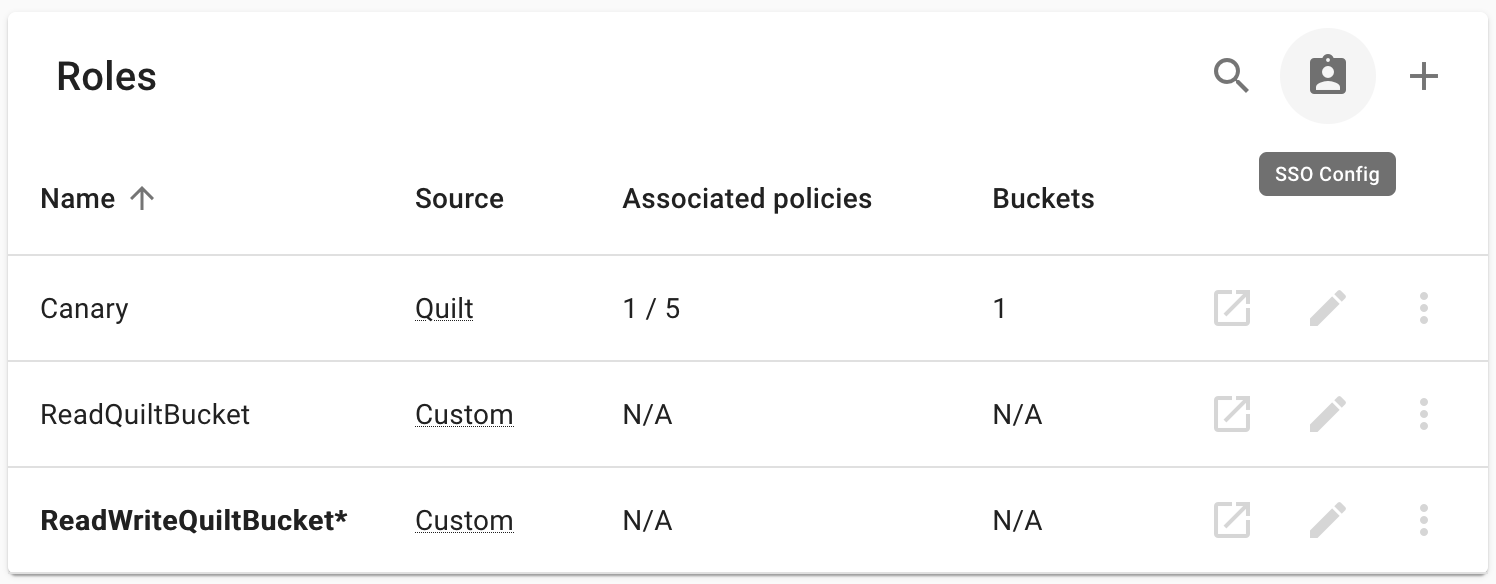
Note: Roles used by configuration can’t be removed or renamed.
Note: The user who sets the configuration will never have their admin flag revoked.
Note: After configuration is set, any user who logs in via SSO can’t be manually assigned roles or admin permissions.
Configuration
The configuration file is to be written in YAML and is defined by this JSON Schema which includes descriptions of all the fields.
Warning: In schemas don’t forget to add claims you want to check to
required, because otherwise the schema will match any ID token even if these claims are missing.
Which claims are matched
Each mapping’s schema is validated against the decoded ID token only.
Quilt does not read the access token, call the provider’s userinfo
endpoint, or resolve OIDC distributed/overage claims (the _claim_sources
pointer Entra emits when a user belongs to more than ~200 groups) — if a
value is not present directly in the ID token, a mapping cannot match on it.
Quilt requests the openid and email scopes at login, plus
offline_access for Entra and Okta. Group or role claims are never pulled in
via a scope — they must be configured to be emitted into the ID token directly
(e.g. via the provider’s token/claim configuration), or the mapping will have
nothing to match.
A mapping can match on any claim in the ID token, not just email or
groups. For example, to map on an Entra app-role roles claim (often
more reliable than groups for guest/cross-tenant users, since app roles
are defined on the resource application itself):
version: "1.0"
default_role: ReadQuiltBucket
mappings:
  - schema:
      type: object
      properties:
        roles:
          type: array
          contains:
            const: QuiltReadWrite
      required:
        - roles
    roles:
      - ReadWriteQuiltBucket
Tip: To confirm exactly which claims arrive in the token, decode it at jwt.ms.
Note: By default, mappings are evaluated in order and only the first matching mapping is applied — to assign multiple roles to a user this way, include all roles in the
rolesarray of a single mapping. Alternatively, setunion_roles: trueat the top level of the config (Quilt Platform 1.69+) to grant the union of roles from all matching mappings; users can switch between the assigned roles via the role switcher, and any role no longer in the match set is revoked on next login.
Note: Under
union_roles: true(Quilt Platform 1.69+), theadminflag is tri-state and is not simply unioned the wayrolesare:
- omitted (or
null) — the mapping does not vote on admin,true— the mapping grants admin,false— the mapping vetoes admin.A user is made admin only if at least one matching mapping sets
admin: trueand no matching mapping setsadmin: false. An explicitadmin: falseon any matching mapping therefore blocks admin even when another matching mapping setsadmin: true(the user who sets the configuration is exempt — see the note above). The admin flag is recomputed and written on every login for any user who matches at least one mapping: if every matching mapping omitsadmin, the user receives no admin vote and is demoted, so omittingadminon a catch-all protects only users who also match anadmin: truemapping. This matters for broad catch-all mappings (e.g. a domain-widepattern) that a privileged user also matches: to keep such users admin, ensure they also match a mapping that setsadmin: truerather than relying on omission alone, and reserveadmin: falsefor when you intend to actively deny admin.With
union_roles: false, only the first matching mapping applies and itsadminvalue alone is used. The default is no admin: omittingadmin(or setting it tonull) on that mapping grants no admin permissions, and because the flag is written on every login, a matched user who would otherwise be admin has it removed. Useadmin: trueto grant admin in this mode.Platforms before 1.69 silently ignore
union_roles(staying in first-match mode) and reject an explicitadmin: nullat upload.
Example
version: "1.0"
default_role: ReadQuiltBucket
union_roles: true
mappings:
  - schema:
      type: object
      properties:
        email:
          const: admin@example.com
      required:
        - email
    roles:
      - AdminTools
    admin: true
  - schema:
      type: object
      properties:
        groups:
          type: array
          contains:
            const: rw
      required:
        - groups
    roles:
      - ReadWriteQuiltBucket
By default (or with union_roles: false), only the first matching mapping
applies — the admin@example.com user above would receive AdminTools only.
With union_roles: true, that same user is granted both AdminTools and
ReadWriteQuiltBucket only if their token also carries group rw (the
second mapping requires it) — otherwise they match the first mapping alone and
receive AdminTools only. When granted both, they can switch between the roles
via the role switcher; a user with group rw only is granted
ReadWriteQuiltBucket in either mode. The admin@example.com user remains
admin because the first mapping sets admin: true, and — when they also match
the second mapping — that mapping omits admin (a non-vote) rather than
setting admin: false; had it set admin: false, admin would be vetoed (see
the tri-state note above).
Note: Users matching no mapping receive the
default_role(ReadQuiltBucketin this example). Their admin flag is unchanged.
Configuring your IdP to emit the required claims
Mappings only match against claims that actually appear in the user’s ID token.
If your mapping checks groups but the IdP doesn’t include a groups claim,
no mapping will match and users will silently fall through to the
default_role — which (per the note above) leaves their admin flag unchanged
from whatever it was before.
A common symptom is users receiving the default_role even though they belong
to the groups referenced in the mappings. Verify by pasting their ID token into
jwt.io and confirming the expected claims are present — or,
if the stack has store_last_login_context: true set in the SSO config, by
reading the idTokenPayload field of UserLastLoginContext via the admin
GraphQL API.
Okta
Okta does not emit a groups claim by default. Which Okta screen you use to
add it depends on which authorization server your Quilt stack is configured
against. Check the iss claim in an existing ID token:
Custom authorization server (iss ends in /oauth2/<id>)
This is the typical Quilt configuration. The legacy app-level Group Claims filter does not apply here; you must add the claim on the authorization server itself:
- Security → API → Authorization Servers →
default→ Claims. - Add Claim:
- Name:
groups - Include in token type:
ID Token,Always - Value type:
Groups - Filter:
Matches regex·.*(or a narrower expression covering the groups your mappings reference — note that bare*is not a valid regex; use.*) - Include in:
Any scope
- Name:
- Create.
Okta Org authorization server (iss has no /oauth2/... path)
Use the legacy app-level filter. Note that the claim name groups is reserved,
so it cannot be added via Token claims → Add expression on the Sign On
tab — that restriction is app-level and does not apply to the authorization
server Claims tab above.
- Open Applications → [Your App] → Sign On tab.
- Under OpenID Connect ID Token, click Show legacy configuration.
- Set Groups claim type to
Filter. - Set Groups claim filter to
groups| Matches regex |.*(or a narrower expression that includes every group your mappings reference). - Save.
After saving, affected users must log out and back in for the new ID token to
include the groups claim. Confirm with jwt.io that the token now contains
something like "groups": ["Everyone", "Employees", ...].