quilt
NOTE: This feature requires Quilt Platform version 1.55.0 or higher
Tabulator aggregates tabular data objects across multiple packages using AWS Athena. Admins define schemas and data sources for CSV, TSV, or Parquet files, enabling users to run SQL queries directly on the contents of Quilt packages. You can even use named capture groups to extract additional columns from the logical key and package name.
Faster, cheaper as of Quilt Platform version 1.70. Tabulator now resolves the packages it needs from the per-bucket Iceberg package index instead of doing a full S3 scan through Glue/Athena SerDe tables on every call. Queries are cheaper and faster end-to-end. Permissions are unchanged: each caller queries under their own bucket-scoped credentials, and existing role and bucket permissions apply automatically.
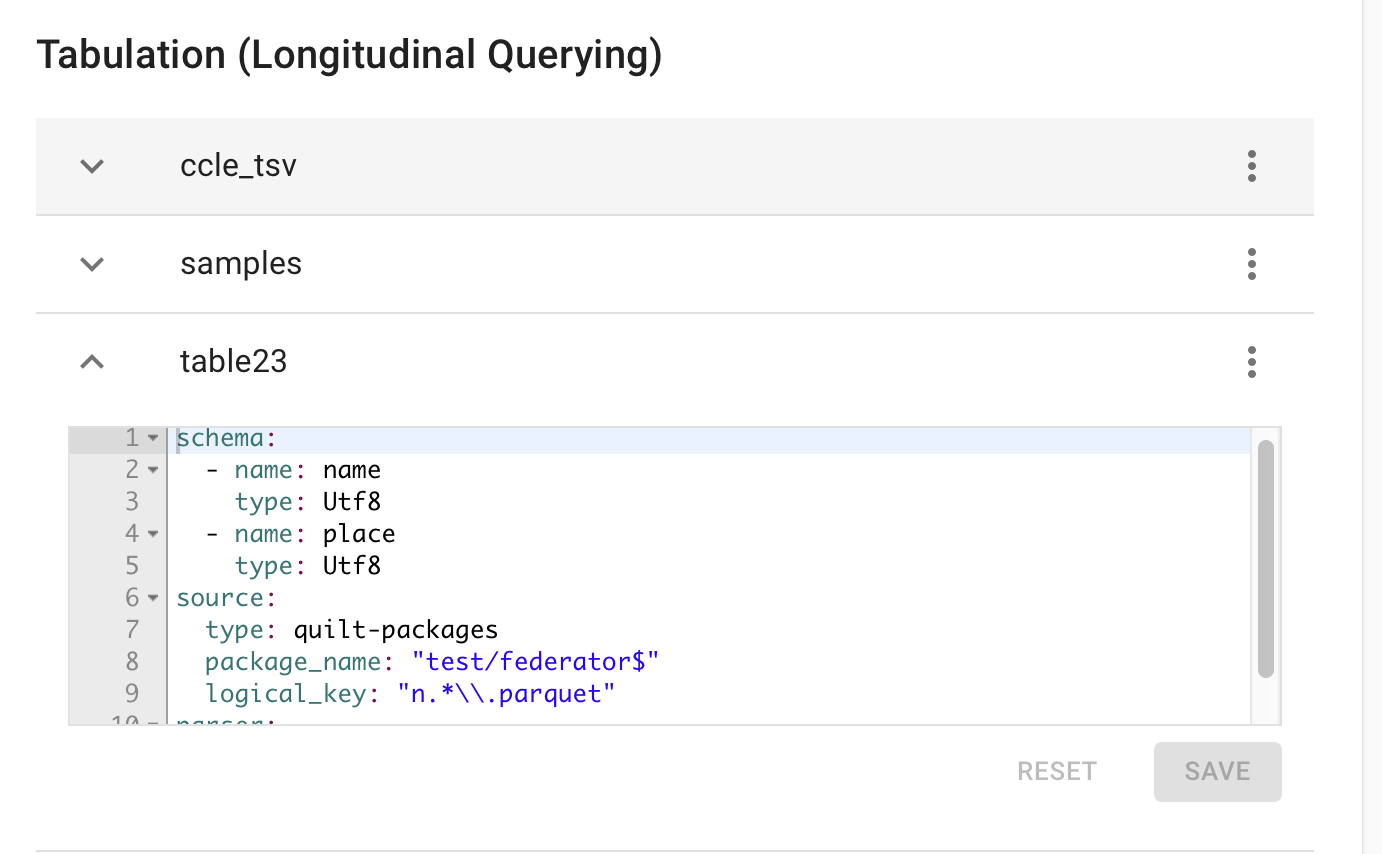
The configuration is written in YAML and managed using the
quilt3.admin.tabulator
APIs or via the
Quilt Admin UI:
Configuration
Each Tabulator configuration is written in YAML, following the structure outlined below.
Example
schema:
  - name: name  # must match ^[A-Za-z][A-Za-z0-9_-]*$
    type: STRING  # usually BOOLEAN, INT, FLOAT, DOUBLE, STRING, DATE, TIMESTAMP
  - name: length
    type: INT
  - name: effective_length
    type: FLOAT
  - name: tpm
    type: FLOAT
  - name: num_reads
    type: FLOAT
source:
  type: quilt-packages  # currently the only supported type
  package_name: "^ccle/(?<date>[^_]+)_(?<study_id>[^_]+)_nfcore_rnaseq$"
  logical_key: "salmon/(?<sample_id>[^/]+)/quant*\\.genes\\.sf$"
parser:
  format: csv  # or `parquet`
  delimiter: "\t"
  header: true
continue_on_error: true
- Schema: The schema defines the columns in the table. Each column must
have a name and a type. The name must match the regular expression
^[A-Za-z][A-Za-z0-9_-]*$(start with a letter; letters, digits, underscores, and hyphens; at most 255 characters). For CSV/TSVs, these names do not need to match the column names in the document. For Parquet, they must match except for case. However, if column names are present in a CSV/TSV, you must setheadertotruein the parser configuration. - Types: Must be uppercase and match the Apache Arrow Data Types used by Amazon Athena. Valid types are BOOLEAN, TINYINT, SMALLINT, INT, BIGINT, FLOAT, DOUBLE, STRING, BINARY, DATE, TIMESTAMP.
- Source: The source defines the packages and objects to query. The
typemust bequilt-packages. Thepackage_nameis a regular expression that matches the package names to include. Thelogical_keyis a regular expression that matches the keys of the objects to include. The regular expression may include named capture groups that will be added as columns to the table. - Parser: The parser defines how to read the files. The
formatmust be one ofcsvorparquet. The optionaldelimiter(defaults to ‘,’) is the character used to separate fields in the CSV file. The optionalheaderfield (defaults to ‘false’) is a boolean that indicates whether the first row of the CSV file contains column names.
Added columns
In addition to the columns defined in the schema, Tabulator will add:
- any named capture groups from the
logical_keyorpackage_nameregular expression $pkg_namefor the package name$logical_keyfor the object as referenced by the package$physical_keyfor the underlying S3 URI$top_hashfor the revision of the package containing the object (currently we query only thelatestpackage revision)$issuefor any problems encountered while parsing the file (new in Quilt Platform version 1.58)
Using Athena to Access Tabulator
The primary way of accessing Tabulator is using the Quilt stack to query those
tables. This can be done by users via the per-bucket “Queries” tab in the Quilt
Catalog, or programmatically via quilt3. See “Usage” below for more details.
As of Quilt Platform version 1.57, admins can enable open query (below) to allow external users to access Tabulator tables directly from the AWS Console, Athena views, or JDBC connectors. This is especially useful for customers who want to access Tabulator from external services, such as Tableau and Spotfire.
Continuing After Errors
Available since Quilt Platform version 1.58
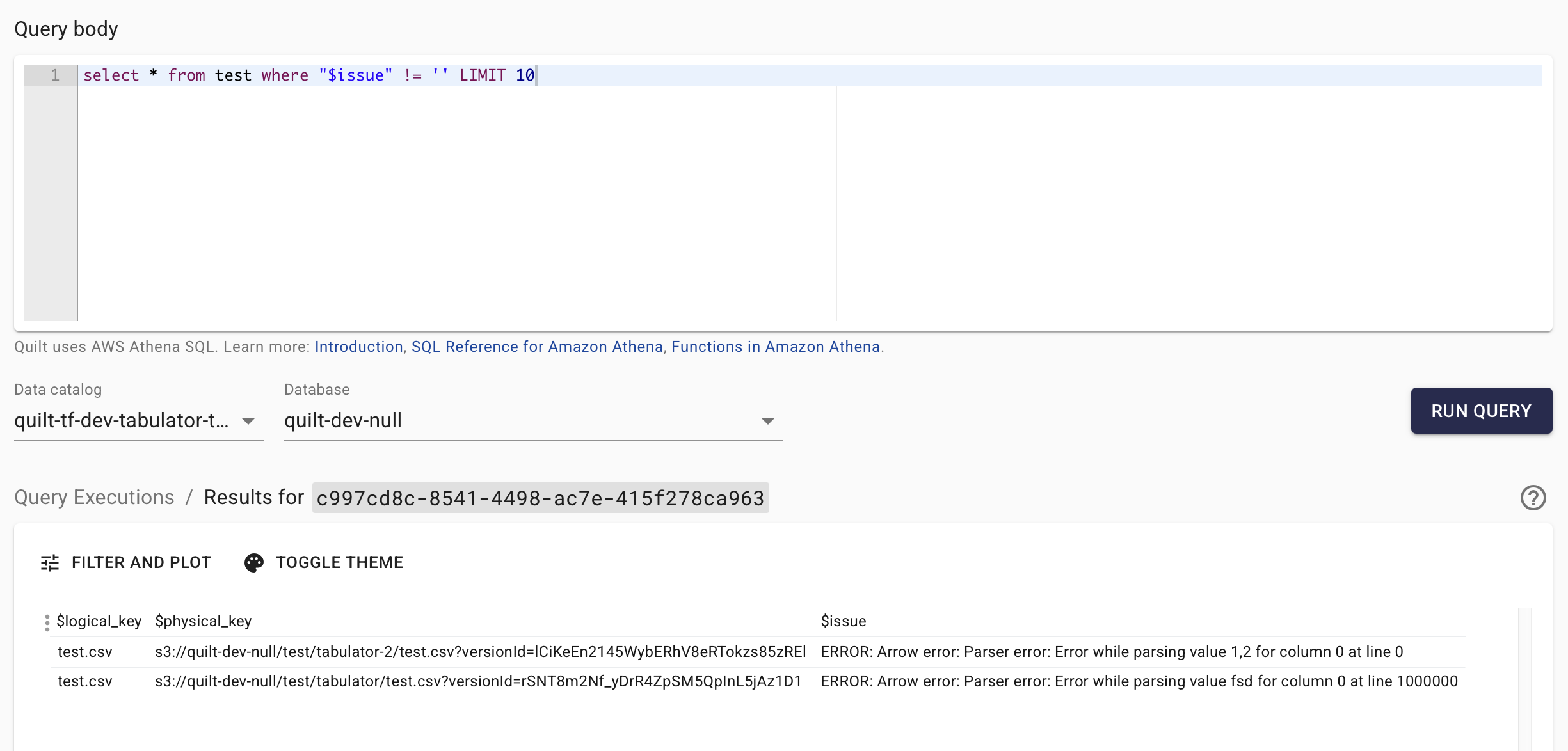
If Tabulator encounters an error while processing a file, it normally stops and returns an error. As of Quilt Platform version 1.58:
-
If a file is missing a
nullablecolumn (the default), Tabulator will automatically fill that column with null, record that fact in the$issuecolumn and continue processing that and other files. -
If
continue_on_erroris set to true, Tabulator will also skip files with other errors (e.g. non-nullable columns, malformed CSVs with non-numeric strings in numeric columns). It will add a single line with non-nullable columns set to a type-appropriate default value (e.g., 0 or “”) and record that fact in the$issuecolumn.
Caveats
- Schema Consistency: All files in the package that match the logical key
must have the exact same schema as defined in the configuration (unless using
Quilt Platform version 1.58 or higher, and using
continue_on_error: true). - Memory Usage: Tabulator may fail on large files (> 10 GB), files with large rows (> 100 KB), and large numbers of files (> 10000). Additionally, Athena has a 16 MB limit per row.
- Cost Management: Querying very large datasets can be expensive (approximately dollars per terabyte). Be sure to set up appropriate cost controls and monitoring.
- Concurrency: Tabulator will attempt to process each file concurrently, but may be limited by the concurrency of Athena or the federation lambda in the region where the query is running. If you are experiencing slow performance, it may be because the concurrency is too low. You can increase the concurrency in that region’s AWS Service Quotas console.
- Athena VPC: If you are using a VPC endpoint for Athena, you must ensure it is accessible from the Quilt stack and Tabulator lambda.
Usage
Once the configuration is set, users can query the tables using the Athena tab from the Quilt Catalog. Note that because Tabulator runs with elevated permissions, it cannot be accessed from the AWS Console by default (unless open query is enabled).
For example, to query the ccle_tsv table from the appropriate workgroup in
the quilt-tf-stable stack, where the database (bucket name) is udp-spec:
SELECT * FROM "quilt-tf-stable-tabulator"."udp-spec"."ccle_tsv"
You can join this with the per-bucket
Iceberg package tables that Quilt maintains
automatically. (As of Quilt Platform version 1.70 these per-bucket Iceberg
tables replace the previous global *_packages-view tables, which have been
removed.) For example, udp-spec_package_manifest holds package-level
metadata keyed by top_hash. These tables live in the Iceberg Glue database
(the IcebergDatabase resource in your stack), which is a different database
from the Tabulator one used above, so qualify them with that database name —
e.g. "<IcebergDatabase>"."udp-spec_package_manifest" — when joining across
the two.
Tabulator exposes the revision of each row’s package as the $top_hash
column, so you can join on it to add package-level metadata to the
tabulated results:
SELECT
  "ccle_tsv".*,
  m.metadata
FROM "quilt-tf-stable-tabulator"."udp-spec"."ccle_tsv"
JOIN "<IcebergDatabase>"."udp-spec_package_manifest" m
  ON "ccle_tsv"."$top_hash" = m.top_hash
From Outside the Quilt Catalog
To call Tabulator from outside the Queries tab, you must use quilt3 to
authenticate against the stack using config() and login(), which opens a web
page from which you must paste in the appropriate access token. Use
get_boto3_session() to get a session with the same permissions as your Quilt
Catalog user, then use the boto3 Athena client to run queries.
If open query is enabled, you can use any AWS credentials providing access to Athena resources associated with Tabulator.
Here is a complete example:
import quilt3
import time

DOMAIN = 'stable'
WORKGROUP = f'QuiltUserAthena-tf-{DOMAIN}-NonManagedRoleWorkgroup'
FULL_TABLE = f'"quilt-tf-{DOMAIN}-tabulator"."udp-spec"."ccle_tsv"'
QUERY = f'SELECT * FROM {FULL_TABLE} LIMIT 10'

quilt3.config(f'https://{DOMAIN}.quilttest.com/')
quilt3.login()
session = quilt3.get_boto3_session()
athena_client = session.client('athena')

response = athena_client.start_query_execution(
    QueryString=QUERY,
    WorkGroup=WORKGROUP
)
query_execution_id = response['QueryExecutionId']
print(f'Query execution ID: {query_execution_id}')

while True:
    execution_response = athena_client.get_query_execution(QueryExecutionId=query_execution_id)
    state = execution_response['QueryExecution']['Status']['State']
    if state in ('SUCCEEDED', 'FAILED', 'CANCELLED'):
        break
    print(f'\tQuery state: {state}')
    time.sleep(1)
print(f'Query finished with state: {state}')

if state == 'SUCCEEDED':
    results = athena_client.get_query_results(QueryExecutionId=query_execution_id)
    for row in results['ResultSet']['Rows']:
        print([field.get('VarCharValue') for field in row['Data']])
else:
    print(f'Query did not succeed. Final state: {state}')
Open Query
Available since Quilt Platform version 1.57
By default, Tabulator is only accessible via a session provided by the Quilt Catalog, and the access is scoped to the permissions of the Catalog user associated with that session. However, admins can choose to enable open query to Tabulator tables, deferring all access control to AWS, thus enabling access from external services. This allows querying Tabulator from the AWS Console, Athena views or JDBC connectors – as long as the caller has been granted the necessary permissions to access Athena resources associated with Tabulator.
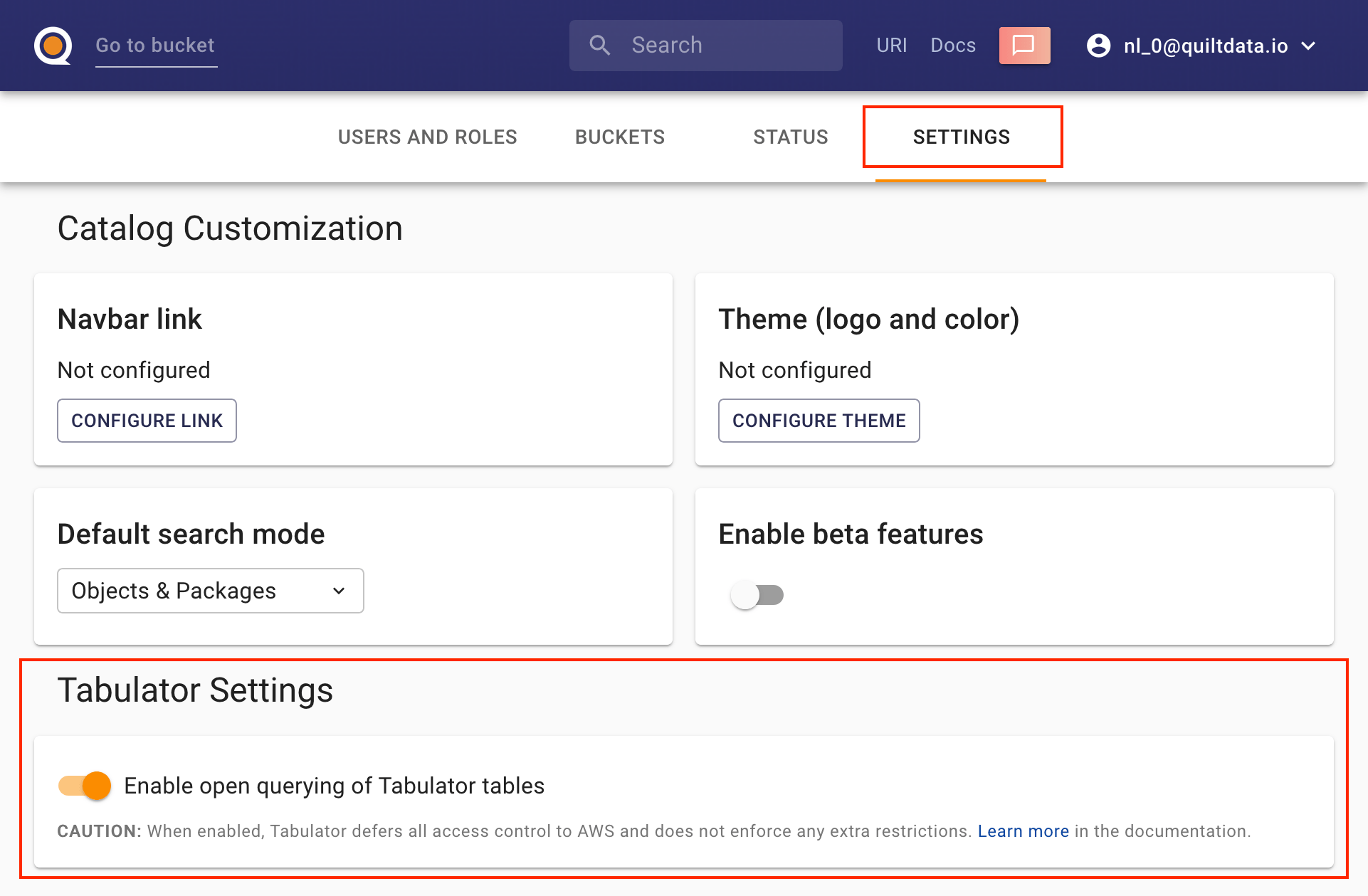
1. Enable Open Query
An admin can enable open query via the quilt3.admin.tabulator.set_open_query()
API
or Admin UI:
2. Configure Permissions
In order to access Tabulator in open query mode, the caller must use a special workgroup, and have permissions to use that workgroup and access tabulator resources. For convenience, Quilt Stack provides a pre-configured workgroup and policy for open query – they can be found in the stack outputs:
-
TabulatorOpenQueryPolicyArn: attach this managed policy to a relevant IAM role (or copy the statements directly to your own role/policy). -
TabulatorOpenQueryWorkGroup: configure your Athena client or connector to use this workgroup (or create your own with the same results output configuration).