quilt
Configuration
Show and hide features in the Quilt catalog
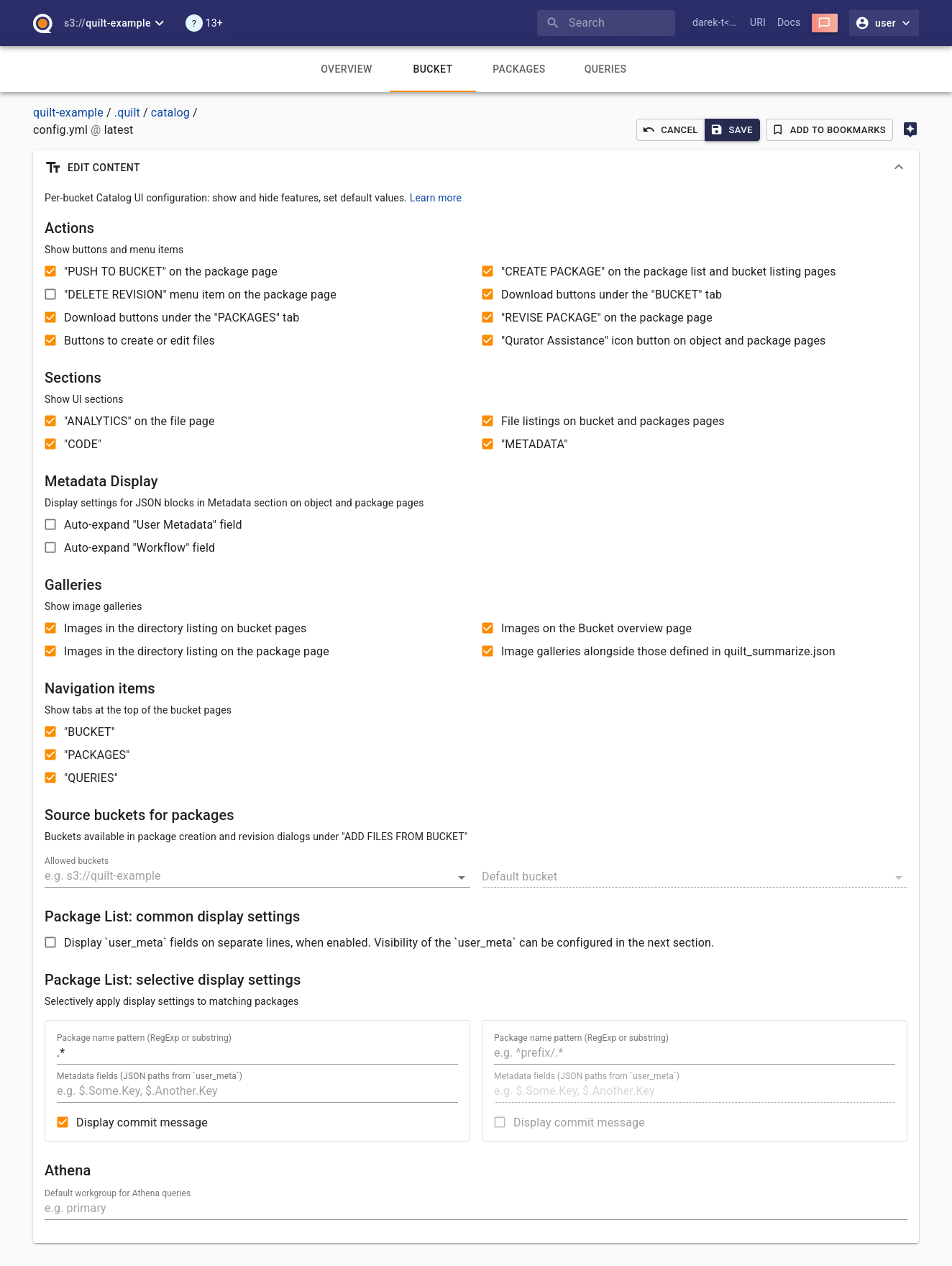
You can use the configuration file to show or hide certain
tabs and buttons in the Quilt catalog. This gives you fine-grained control
over how users interact with the Quilt catalog. There is one catalog config file
per-bucket. The config file’s path is s3://BUCKET/.quilt/catalog/config.yaml.
If there is no config.yaml, or your config.yaml file does not override the ui
key, then the following defaults are used:
ui:
  nav:
    files: True
    workflows: True
    packages: True
    queries: True
  actions:
    copyPackage: True
    createPackage: True
    deleteObject: False
    deleteRevision: False
    downloadObject: True
    downloadPackage: True
    openInDesktop: True
    restore: True
    revisePackage: True
    writeFile: True
  blocks:
    analytics: True
    browser: True
    code: True
    qurator: True
    gallery:
      files: True
      packages: True
      overview: True
      summarize: True
    meta:
      user_meta:
        expanded: False
      workflows:
        expanded: False
  package_description:
    .*:
      message: True
  package_description_multiline: False
Properties
ui.nav.files: False- hide Files tabui.nav.workflows: False- hide Workflows tabui.nav.packages: False- hide Packages tabui.nav.queries: False- hide Queries tabui.actions: False- hide all buttons used to create and edit packages and files (make the catalog “read-only”)ui.actions.copyPackage: False- hide buttons to push packages across bucketsui.actions.createPackage: False- hide buttons to create packages via drag-and-drop or from folders in S3ui.actions.deleteObject: True- show buttons to delete files and directories (off by default since 1.66 to prevent accidental deletions)ui.actions.deleteRevision: True- show buttons to delete package revisionui.actions.downloadObject: False- hide download buttons under the “Files” tabui.actions.downloadPackage: False- hide download buttons under “Packages” tabui.actions.openInDesktop: False- hide the “Open in QuiltSync” option (this key is not shown in the visual preferences editor, but works via YAML)ui.actions.restore: False- hide the button to restore (rehydrate) archived S3 Glacier / Deep Archive objectsui.actions.revisePackage: False- hide the button to revise packagesui.actions.writeFile: False- hide buttons to create or edit filesui.blocks.analytics: False- hide Analytics block on file pageui.blocks.browser: False- hide files browser on both the Files and Packages tabsui.blocks.code: False- hide Code block with quilt3 code boilerplateui.blocks.qurator: False- hide the Qurator assistance button on file pagesui.blocks.gallery: False- hide all galleries (see below for list of galleries)ui.blocks.gallery.files: False- hide gallery in the Files tab; this gallery lists all images in the current directoryui.blocks.gallery.packages: False- hide gallery in Packages tab; this gallery lists all images in the current directory in packageui.blocks.gallery.overview: False- hide gallery in Overview tab; this gallery lists all images in the current bucketui.blocks.gallery.summarize: False- hide gallery whenquilt_summarize.jsonis presentui.blocks.meta: False- hide Metadata block on Package pageui.blocks.meta.user_meta.expanded: True- expands user_meta propertiesui.blocks.meta.workflows.expanded: 2- expands workflows two level deepui.sourceBuckets- a dictionary of S3 bucket names that map to an empty object reserved for future enhancements; buckets in this dictionary are the ones offered when the user clicks Revise Package > Add files from Bucket; by default, the current bucket is always available; set to an empty dictionary{}to disable this featureui.defaultSourceBucket- source bucket fromui.sourceBucketsthat is selected by default; if it doesn’t match any bucket then it’s ignoredui.package_description- a dictionary that maps package handle regular expressions to JSONPath expressions of fields to show from package metadata in the package list view.ui.package_description_multiline: True- expands package metadata’s root key/valuesui.athena.defaultWorkgroup- default workgroup to select on the Athena page
ui.sourceBuckets example
ui:
  sourceBuckets:
    s3://bucket-a: {}
    bucket-b: {}  # "s3://" prefix is optional
    s3://bucket-c: {}
  defaultSourceBucket: s3://bucket-b
By default, users can add files from the current bucket when creating
or revising packages. The current bucket is automatically available
in the file picker without requiring configuration.
To restrict this functionality and disable adding files from any bucket
(including the current one), set ui.sourceBuckets to an empty dictionary {}
in your configuration file.
ui.package_description example
ui:
  package_description:
    # match all packages
    .*:
      # show the message
      message: True
      # show the .labels field
      user_meta:
        - $.labels
    # for any package with a handle prefix of foo
    ^foo/.*:
      # JSONPath expressions to the fields to display
      user_meta:
        - $.key1.key2
        - $.key3
        - $.key4[0]

ui.athena example
ui:
  athena:
    defaultWorkgroup: primary
ui.blocks.meta
User could set it to boolean or object with additional properties.
Object is a truthy value, so any object acts like True.
# default value, show Metadata block
ui:
  blocks:
    meta: True
# Hide Metadata block
ui:
  blocks:
    meta: False
# Show Metadata block and expand `user_meta` object
# consider large `user_meta` objects, they can affect UI responsiveness
ui:
  blocks:
    meta:
      user_meta:
        expanded: True